

Think Vault Guide
Disable a User
Revoke access when an employee leaves and review their password history.
Prerequisites
You must be a Site Deluxe Administrator to disable users.
How to Disable a User
Disabling a user does not delete their account. It immediately revokes their access to all company passwords.
- Log in to the Think Vault web portal.
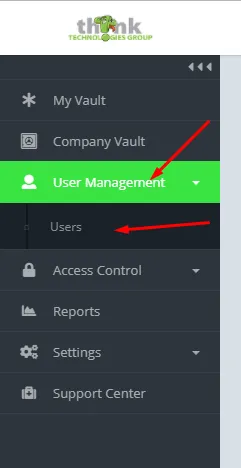
- Click User Management → Users.
- Find the user you want to disable, click the triple-dot menu, and select Disable User.
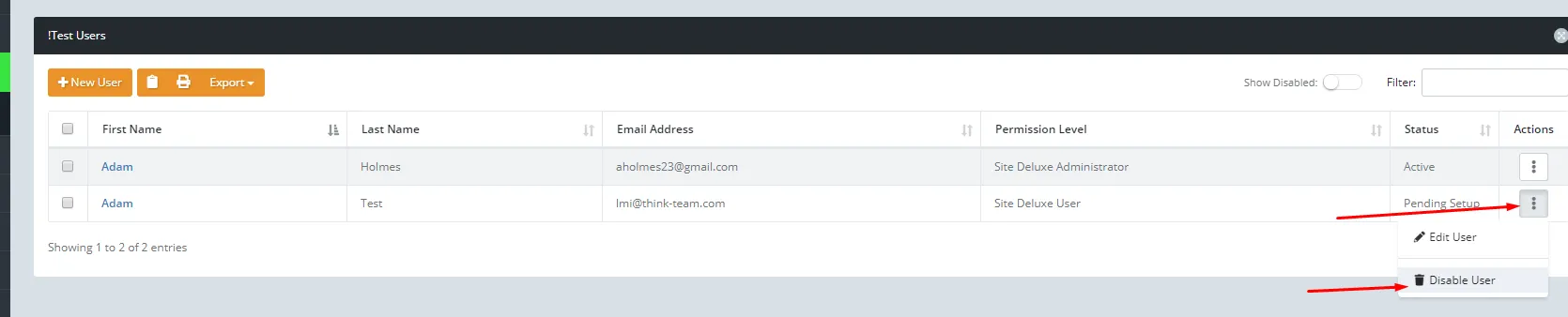
That user’s access is revoked immediately.
What to Do Next
After disabling the user, you should rotate any passwords they had access to. Use the Audit Reports to pull a full list of every password the user viewed or copied during their time with the company. This tells you exactly which credentials need to be changed.
Need help with Think Vault?
Your dedicated consultant can walk you through setup, permissions, or anything else.